You will get I will clean and fix your messy excel spreadsheet using power query
Project details
Here's what I fix in every project:
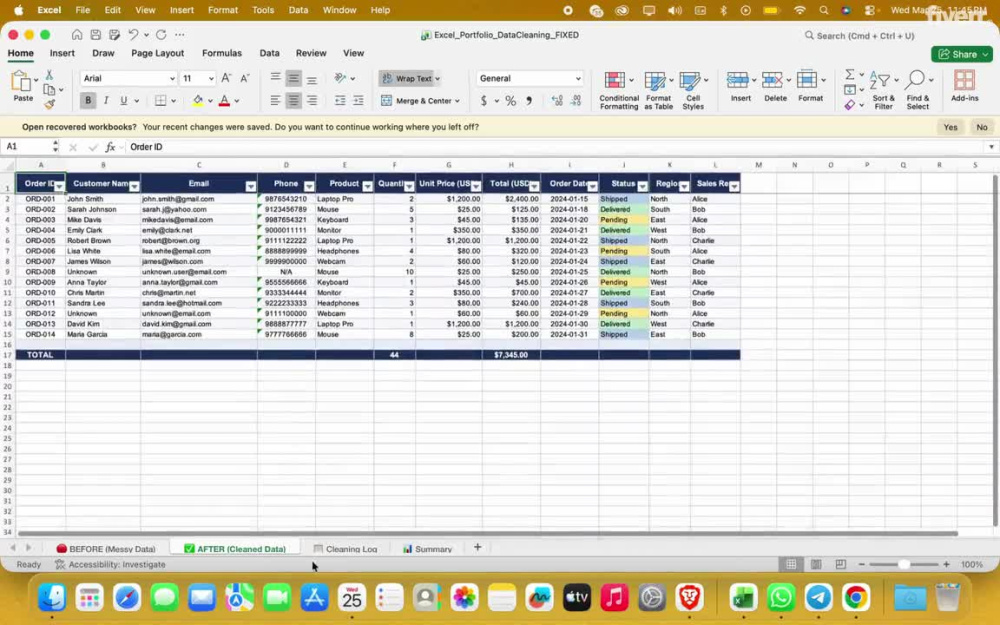
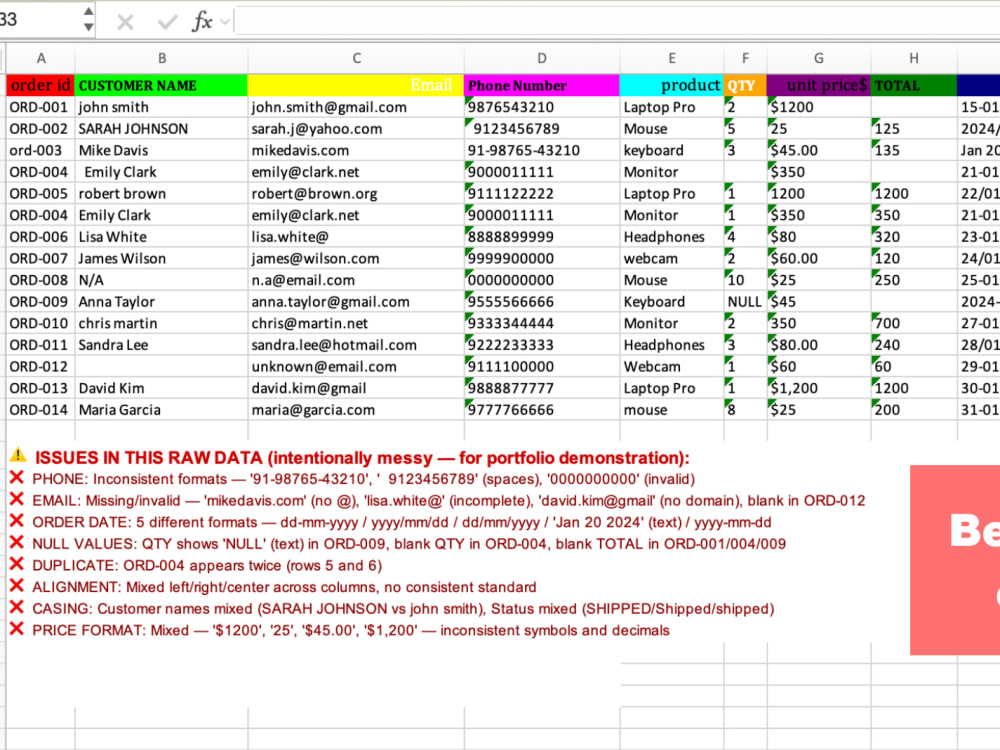
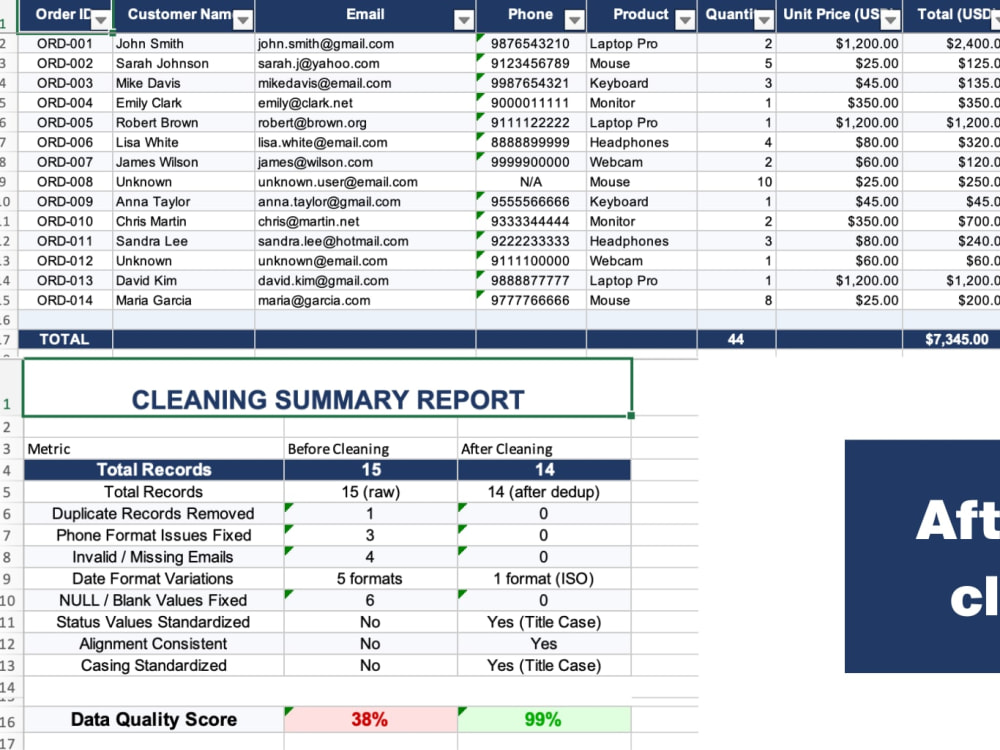
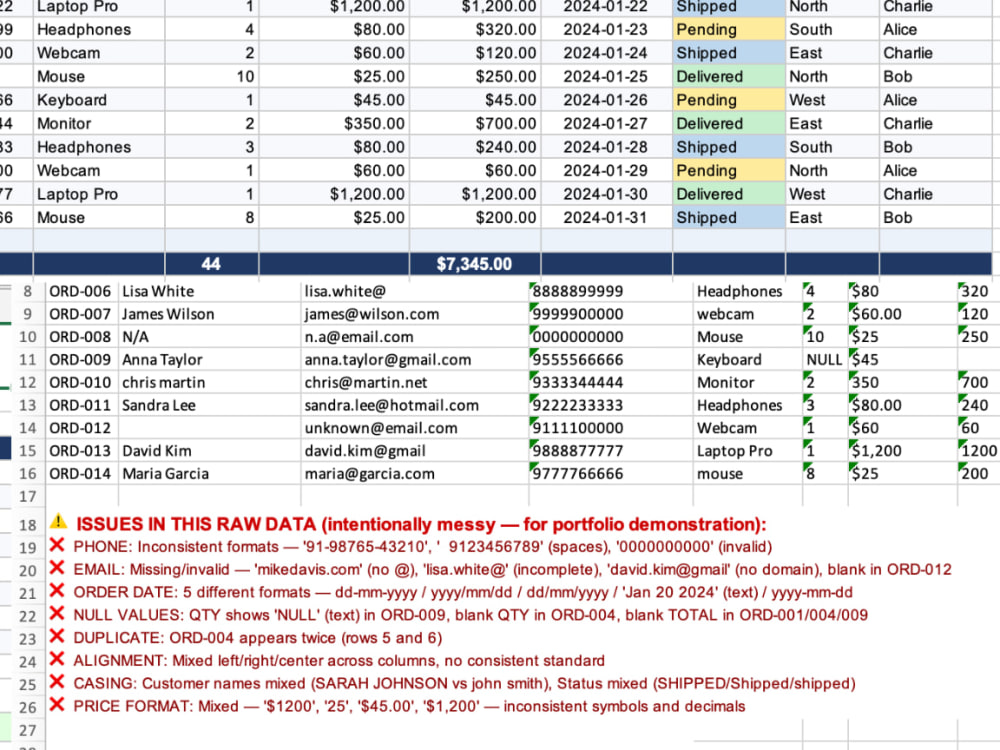
Duplicate records identified by key column and removed Phone numbers strips spaces, dashes, country codes clean 10-digit format Email addresses validates format, fixes incomplete domains, fills blank cells Date formats converts ALL variations (dd-mm-yyyy, text, slashes) to one standard (YYYY-MM-DD) NULL & blank values 'NULL' text, blank cells standardized defaults Mixed text casing JOHN SMITH or john smith John Smith (Title Case) Price/currency formats strips $, commas clean number format Alignment consistent left/center/right alignment across all columns Status values SHIPPED, Shipped, shipped Shipped (standardized)
What makes my work different: I deliver a Before & After comparison sheet so you can see every change made I include a Cleaning Log documenting every issue found and fixed I include a Summary sheet showing your data quality score before and after I use Power Query so the cleaning can be re-run automatically on future data
Before ordering, please message me with your file. I will confirm the scope and let you know exactly what needs to be fixed no surprises.
Delivered as a clean .xlsx file with full documentation.
Duplicate records identified by key column and removed Phone numbers strips spaces, dashes, country codes clean 10-digit format Email addresses validates format, fixes incomplete domains, fills blank cells Date formats converts ALL variations (dd-mm-yyyy, text, slashes) to one standard (YYYY-MM-DD) NULL & blank values 'NULL' text, blank cells standardized defaults Mixed text casing JOHN SMITH or john smith John Smith (Title Case) Price/currency formats strips $, commas clean number format Alignment consistent left/center/right alignment across all columns Status values SHIPPED, Shipped, shipped Shipped (standardized)
What makes my work different: I deliver a Before & After comparison sheet so you can see every change made I include a Cleaning Log documenting every issue found and fixed I include a Summary sheet showing your data quality score before and after I use Power Query so the cleaning can be re-run automatically on future data
Before ordering, please message me with your file. I will confirm the scope and let you know exactly what needs to be fixed no surprises.
Delivered as a clean .xlsx file with full documentation.
Data Entry Type
Data Cleansing, Document Conversion, Error Detection, Online ResearchData Entry Tool
Google Sheets, Microsoft Excel, Microsoft OfficeWhat's included
| Service Tiers |
Starter
$15
|
Standard
$20
|
Advanced
$25
|
|---|---|---|---|
| Delivery Time | 1 day | 2 days | 4 days |
Number of Revisions | 2 | 4 | 7 |
Number of Hours of Work | 1 | 2 | 4 |
Formatting & Clean Up | |||
Graph & Table Creation | - |
Optional add-ons
You can add these on the next page.
Additional Revision
+$5
Additional Hour of Work
+$5
Graph & Table Creation
(+ 5 Days)
+$5About Abhishek
Real Estate Data Cleaning Specialist | Excel Power Query Duplicate
Bengaluru, India - 9:14 pm local time
I am Abhishek Raikwar — a Data Cleaning Specialist helping real estate agents, property managers, and investment firms transform messy Excel data into clean, accurate, and usable databases.
I use Microsoft Excel and Power Query to fix duplicates, standardize formats, fill missing values, and deliver fully documented, client-ready data — fast.
Steps for completing your project
After purchasing the project, send requirements so Abhishek can start the project.
Delivery time starts when Abhishek receives requirements from you.
Abhishek works on your project following the steps below.
Revisions may occur after the delivery date.
Initial File Review & Assessment
Review the client's Excel file to understand data structure, identify issues (blank cells, duplicates, inconsistent formatting), and confirm project scope. Provide client with estimated timeline and flag any major concerns before starting.
Data Backup & Structure Preservation
Create a backup copy of the original file before making any changes. Preserve original formatting and formulas where needed. Set up a clean working sheet separate from raw data.