You will get Mobile App UX/UI Design | iOS & Android | Figma
Project details
You have a mobile app idea, or an existing app that needs work, and you need a designer who can handle it properly from start to finish.
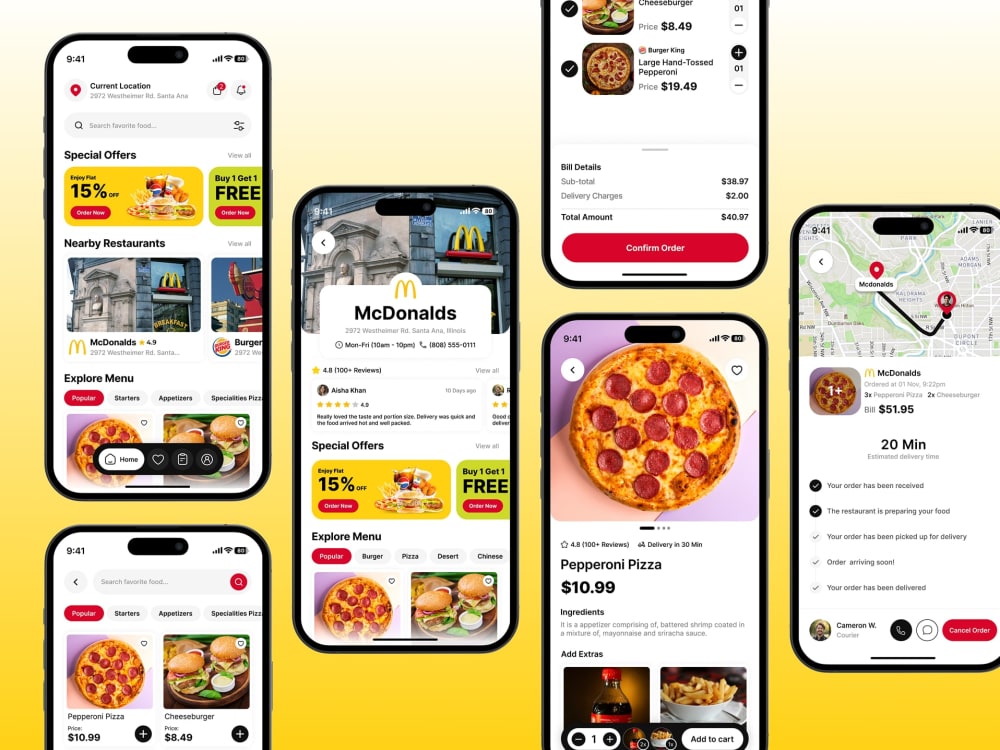
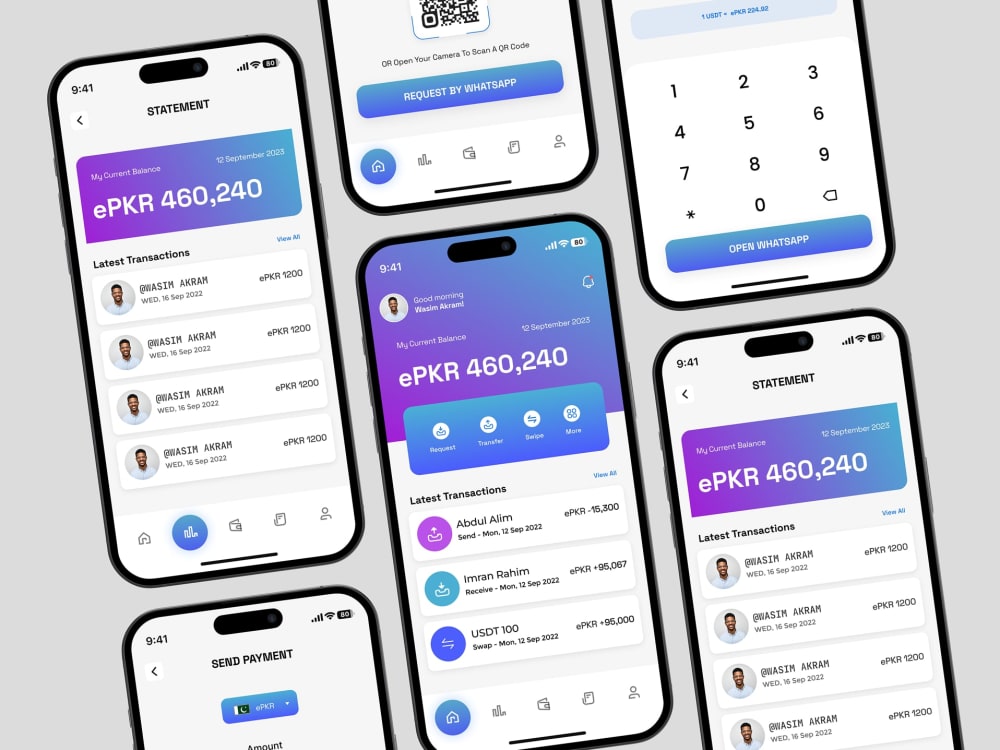
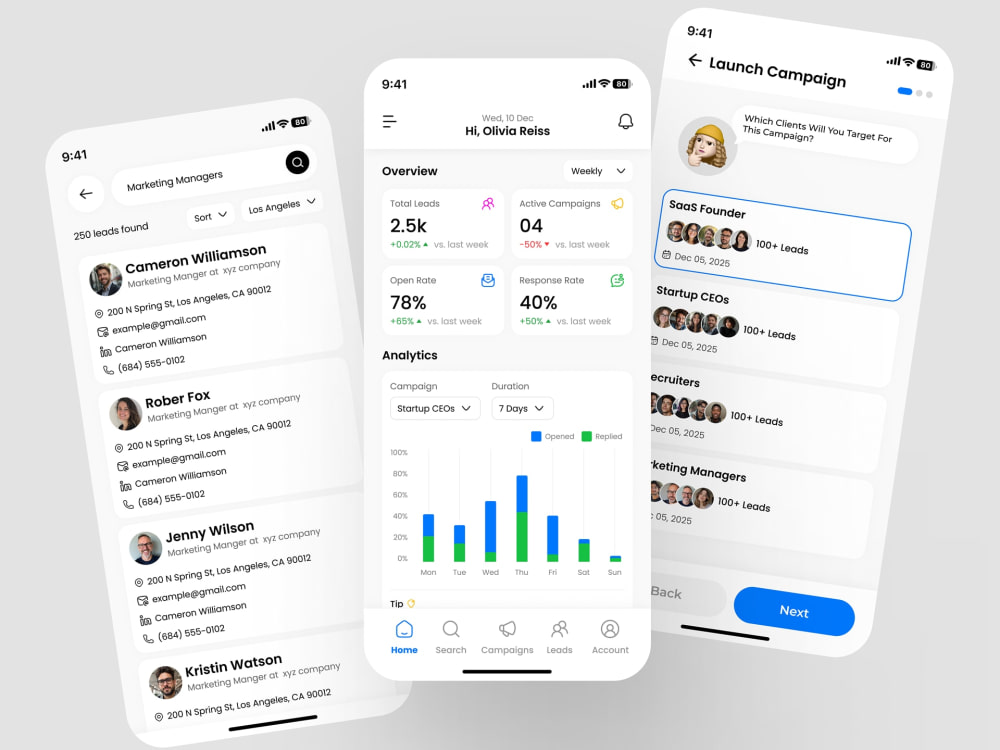
I design iOS and Android apps in Figma. Whether you need a full app built from scratch or specific screens redesigned, I work through the problem first, then design the solution.
Here is what matters to most clients I have worked with: you want a design that your developers can actually build, that your users can actually understand, and that does not need three rounds of back and forth to get right. That is what I focus on.
WHAT YOU GET IN EVERY PACKAGE:
→ High-fidelity iOS and Android UI in Figma
→ Interactive prototype your team can click through and test
→ Component library your developers can work from directly
→ Full handoff documentation with specs and assets
→ App Store and Google Play screenshots
INDUSTRIES: Fintech · Healthcare · eCommerce · SaaS · EdTech · Consumer Mobile
TOOLS: Figma · Sketch · Adobe XD · Material Design · Human Interface Guidelines
Message me before ordering. Tell me what you are building and I will tell you which package makes sense for your project.
I design iOS and Android apps in Figma. Whether you need a full app built from scratch or specific screens redesigned, I work through the problem first, then design the solution.
Here is what matters to most clients I have worked with: you want a design that your developers can actually build, that your users can actually understand, and that does not need three rounds of back and forth to get right. That is what I focus on.
WHAT YOU GET IN EVERY PACKAGE:
→ High-fidelity iOS and Android UI in Figma
→ Interactive prototype your team can click through and test
→ Component library your developers can work from directly
→ Full handoff documentation with specs and assets
→ App Store and Google Play screenshots
INDUSTRIES: Fintech · Healthcare · eCommerce · SaaS · EdTech · Consumer Mobile
TOOLS: Figma · Sketch · Adobe XD · Material Design · Human Interface Guidelines
Message me before ordering. Tell me what you are building and I will tell you which package makes sense for your project.
Main Type
Mobile AppsFile Format
JPG, PDF, PNG, SVGWhat's included
| Service Tiers |
Starter
$420
|
Standard
$1,225
|
Advanced
$1,750
|
|---|---|---|---|
| Delivery Time | 7 days | 14 days | 21 days |
Number of Revisions | 3 | 3 | Unlimited |
Source Files |
7 reviews
(7)
(0)
(0)
(0)
(0)
This project doesn't have any reviews.
OY
Ozan Y.
Feb 21, 2025
Multiple iOS Apps Screenshots
Very good designer. Worked a couple times together already and I will defintely work again.
ME
Morten E.
Feb 19, 2025
Improve graphics for Play store - Clock...
Once again: Fast, high quality, very responsive, good communication. I can highly recommend Adnan.
ME
Morten E.
Dec 27, 2024
Fixes to store graphics
Fast, high quality, very responsive, good communication. I can highly recommend Adnan.
ME
Morten E.
Dec 23, 2024
Graphics for Google Play
Adnan delivered high quality fast and on time.
OY
Ozan Y.
Dec 9, 2024
iOS App Screenshots
About Adnan
Mobile App UX/UI Designer | iOS & Android | 270+ Completed Projects
100%
Job Success
Multan, Pakistan - 4:18 pm local time
I am a Mobile App UX/UI Designer with 6 years of experience designing iOS and Android apps. I have worked on 270+ projects, mostly mobile apps, across fintech, healthcare, eCommerce, SaaS, and edtech. 25+ of those apps are live on the App Store and Google Play right now.
I work in two ways depending on what you need:
⤷ If you are starting from scratch, I take your idea through user flows, wireframes, high-fidelity UI, and a complete Figma handoff your developers can build from on day one.
⤷ If you already have an app but users are dropping off at onboarding or not coming back after day one, I audit the experience, find where the friction is, and fix it.
One example worth sharing:
One fintech app I redesigned saw onboarding completion rise from 54% to 83% after I restructured the user flow and simplified the first three screens.
💬 Here is what clients say about working with me:
⭐⭐⭐⭐⭐ "Work consistently exceeds expectations. Having hired multiple times, each experience has been nothing short of excellent."
— Danli Chen, United States
⭐⭐⭐⭐⭐ "Delivered exactly what we needed to pitch investors."
— Ewalton, United States
WHAT I DELIVER ON EVERY PROJECT:
⤷ User flows and wireframes before any visual design starts
⤷ High-fidelity iOS and Android UI in Figma
⤷ Interactive prototype for testing or stakeholder review
⤷ Mobile design system and component library
⤷ Developer-ready Figma handoff, organized and fully documented
⤷ App Store and Google Play listing screenshots
HOW I WORK:
Figma is my main tool. I use FigJam for flow mapping and Miro for research. I work async, share progress at every milestone, and respond within a few hours. Every file I deliver has named layers, components, and specs so your developer does not need to chase me for clarification.
INDUSTRIES:
Fintech · Healthcare · eCommerce · SaaS · EdTech · Consumer Mobile
TOOLS:
Figma · FigJam · Sketch · Adobe XD · Miro · Adobe Creative Suite
📩 If this sounds like what your project needs, send me a message and we can talk through the details.
👀 Search Keywords:
Mobile app UI/UX designer, Mobile app UX/UI designer, Mobile app UX UI designer, Mobile app UX & UI designer, Mobile app UI designer, Mobile UI design, Mobile app design, Mobile app Figma design, User experience design, UI/UX designer, Wireframes, Prototypes, Health mobile app, SaaS, Figma, AI, App Store screenshots, progressive disclosure, cross-functional collaboration, mobile design system, component library, developer handoff, Figma handoff, mobile UI designer, app UI design
Steps for completing your project
After purchasing the project, send requirements so Adnan can start the project.
Delivery time starts when Adnan receives requirements from you.
Adnan works on your project following the steps below.
Revisions may occur after the delivery date.
Project Brief
Share your app details, target users, platform, and goals. We align on scope and screen list before anything starts.
Wireframes
Full UX projects only — UI only projects skip to Step 3. Low-fidelity wireframes covering all key screens, flows, and navigation logic.