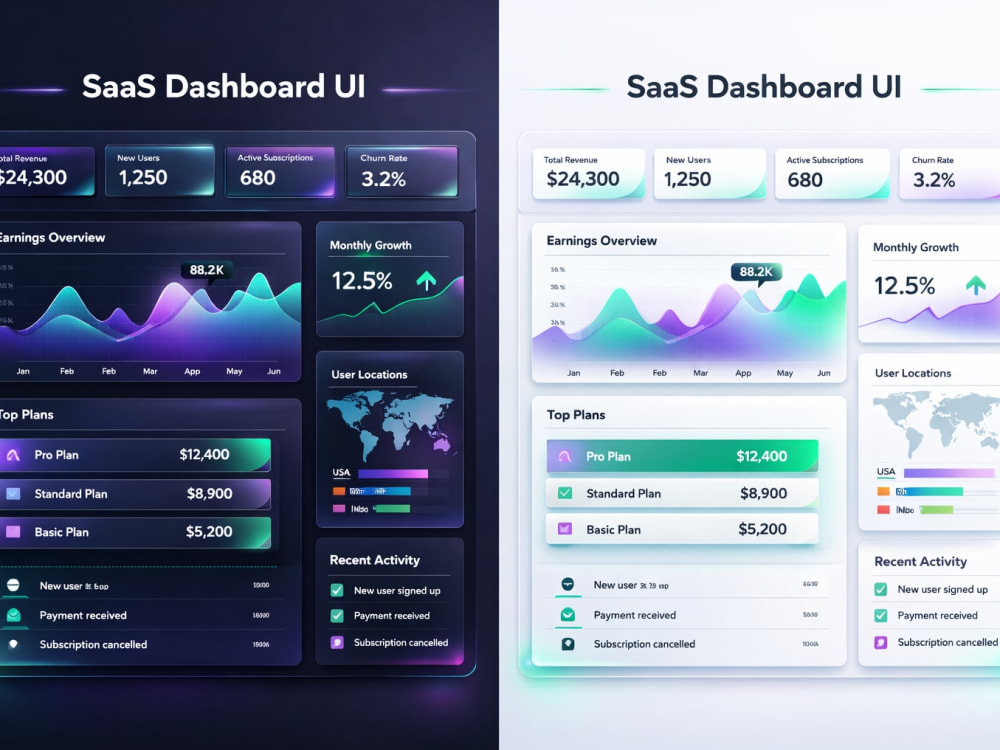
You will get modern SaaS dashboard UI UX design in Figma
Project details
I will design a clean, modern and user-friendly SaaS dashboard tailored to your business needs. Whether you're building a startup product or improving an existing platform, I focus on intuitive layouts, data visualization, and seamless user experience.
Custom dashboard UI design
Clean and modern layouts
Data visualization (charts, graphs)
Developer-friendly Figma files
UX-focused structure
Perfect for SaaS products, admin panels, analytics dashboards and more.
Custom dashboard UI design
Clean and modern layouts
Data visualization (charts, graphs)
Developer-friendly Figma files
UX-focused structure
Perfect for SaaS products, admin panels, analytics dashboards and more.
Main Type
Email Templates, Landing Pages, Mobile Apps, Web Apps, Website, OtherFile Format
JPG, PDF, PNG, PSD, AI, SVGWhat's included
| Service Tiers |
Starter
$35
|
Standard
$75
|
Advanced
$150
|
|---|---|---|---|
| Delivery Time | 2 days | 5 days | 14 days |
Number of Revisions | 9 | Unlimited | Unlimited |
Source Files |
About Eesha
Graphic Design | Figma, UX & UI Design, User Experience Design
Sargodha, Pakistan - 2:20 am local time
As a graphic designer, I bring strong capabilities in branding, logo creation, and marketing collateral, ensuring your brand stands out. I leverage tools like Figma, Adobe XD, and Photoshop to craft designs that resonate with users and reflect your vision.
Let's connect to explore how I can elevate your brand’s digital presence and create impactful user experiences that foster growth and engagement. I look forward to collaborating and bringing your ideas to life.
Steps for completing your project
After purchasing the project, send requirements so Eesha can start the project.
Delivery time starts when Eesha receives requirements from you.
Eesha works on your project following the steps below.
Revisions may occur after the delivery date.
Requirements Gathering & Project Brief
Collect all details from the client — understand the app’s goal, target users, pain points, and expectations — to ensure the design is accurate, user-friendly, and meets their objectives.