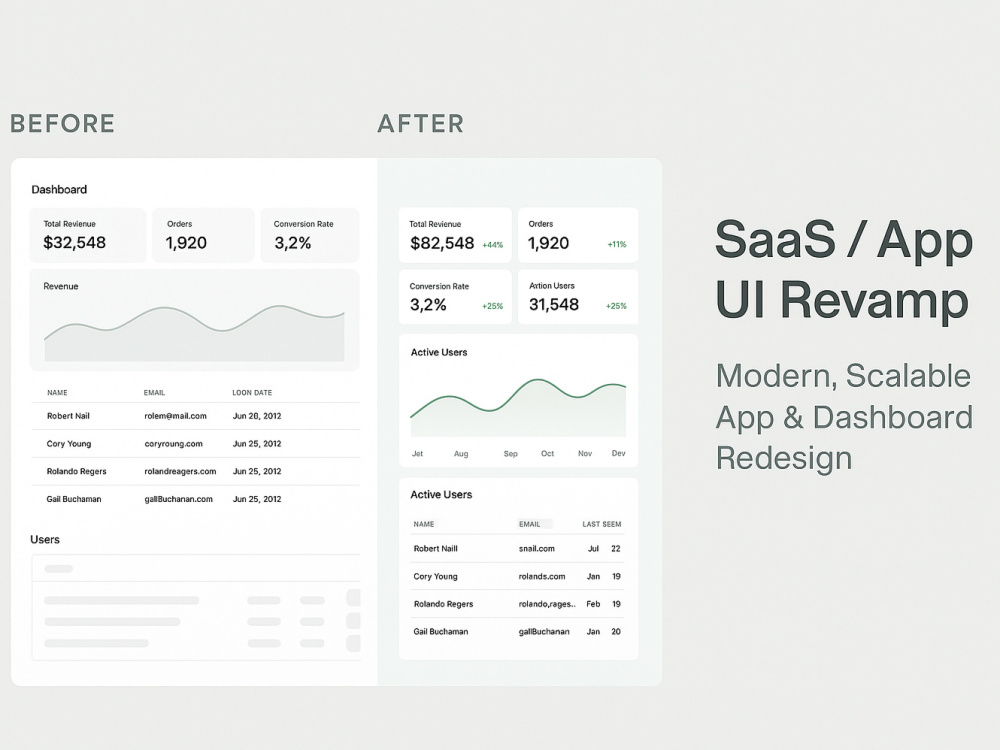
You will get Revamp of your existing web or app with a clean, modern & consistent design
Project details
Your product already works but it could look cleaner, clearer, and more consistent.
I’ll redesign your key SaaS or app screens in Figma, aligning the UI with modern standards and making it easier for both users and developers to navigate.
You’ll get:
• A modernized, scalable UI,
• Developer-friendly Figma files, and
• Consistent design language that’s easy to maintain.
Ideal for teams ready to refresh their product visuals or unify design after growth.
I’ll redesign your key SaaS or app screens in Figma, aligning the UI with modern standards and making it easier for both users and developers to navigate.
You’ll get:
• A modernized, scalable UI,
• Developer-friendly Figma files, and
• Consistent design language that’s easy to maintain.
Ideal for teams ready to refresh their product visuals or unify design after growth.
Main Type
Landing Pages, Mobile Apps, Web Apps, WebsiteFile Format
JPG, PDF, PNG, SVG, OtherWhat's included
| Service Tiers |
Starter
$400
|
Standard
$900
|
Advanced
$1,800
|
|---|---|---|---|
| Delivery Time | 3 days | 7 days | 14 days |
Number of Pages | 3 | 5 | 10 |
Number of Revisions | 1 | 2 | 3 |
Source Files | |||
Commercial Use | |||
Convert to HTML/CSS | - | - | - |
Responsive Design | |||
Interactive Mockup | - | - |
Optional add-ons
You can add these on the next page.
Additional Page
+$100
Additional Revision
+$75Frequently asked questions
About David
Senior Figma UX/UI Designer - Product Design System, SaaS & Prototypes
Brighton, United Kingdom - 1:53 am local time
If your product feels a bit heavy or scattered, I’ll help you tidy it up—from early idea to working prototype—so it feels simple, consistent, and ready to scale.
1. What I Do
- SaaS & Product UX: dashboards, onboarding, analytics, billing, admin tools.
- Design Systems: tokens, variables, reusable components, and documentation.
- Prototyping: interactive Figma builds you can test or share.
- Developer Handoff: clean structure, Auto Layout, clear naming, props, Storybook mapping.
- Idea-to-Prototype Sprints: turning rough ideas into clickable prototypes in under two weeks.
2. How I Work
Discovery / Context – we talk about your goals and pain points.
Structure (optional) – map the product and spot what can be simplified.
Systemise (optional) – create grids, tokens, and core components.
Design & Prototype – bring ideas to life in Figma.
Validate – test it, see what works, fix what doesn’t.
Handoff – deliver organized files that developers can use right away.
People I’ve worked with often say I bridge design and development while keeping end user in mind.
3. Ways We Can Work Together
- Idea-to-Prototype Sprint (10–14 days) – from concept to clickable Figma prototype.
- MVP Design Sprint (2 weeks) – main flows + starter design system.
- UX Audit (5–7 days) – quick review, prioritised fixes, Loom summary.
- Design System Starter (2–3 weeks) – tokens, components, docs, handoff.
- Ongoing Product Design (retainer) – steady design support as your product grows.
4. Tools & Collaboration
Figma / FigJam, Framer, Maze, Notion, Loom, Jira, Adobe Creative Suit, Slack, Whatsapp.
I work easily with various teams.
Based in London; replies within 24h; NDA-friendly.
5. What Clients Say
“Understands complex workflows and makes them feel simple.”
“Clean, organized Figma files that developers love.”
“Great person to work with .”
6. Typical Engagement
Hourly: $60–$90 | Project minimum: $2,000 | 20–30 hrs/week availability.
Let’s make your product easier to use and easier to build.
Send me your Figma file or a short brief, and I’ll outline a clear next step.
Systems before pixels; structure first, design second.
Steps for completing your project
After purchasing the project, send requirements so David can start the project.
Delivery time starts when David receives requirements from you.
David works on your project following the steps below.
Revisions may occur after the delivery date.
Audit & Goals
Review of the current design and identification of the main pain points.
Visual Direction
Establishing colour, typography, and layout structure.