You will get A Budget Expense Tracer website application
Project details
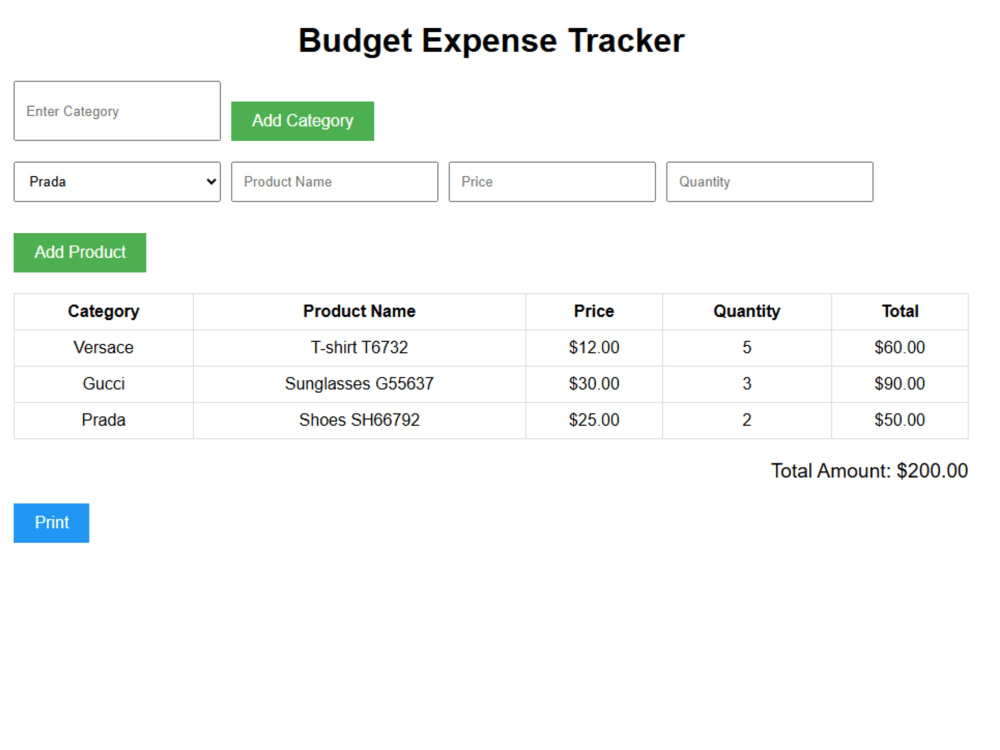
The Budget Expense Tracker is a user-friendly web application designed to help individuals manage their finances effectively. Built with HTML, CSS, and JavaScript, it allows users to add and categorize products, calculate total expenses, and maintain an organized record of their spending.
Key Features:
Product Management: Users can add products with details such as name, price, quantity, and category.
Dynamic Calculations: The application automatically calculates the total amount based on the entered product details.
Category Organization: Products can be categorized for better organization and analysis.
Printable Summary: A print-friendly summary of the added products and total amount is available for offline reference.
Key Features:
Product Management: Users can add products with details such as name, price, quantity, and category.
Dynamic Calculations: The application automatically calculates the total amount based on the entered product details.
Category Organization: Products can be categorized for better organization and analysis.
Printable Summary: A print-friendly summary of the added products and total amount is available for offline reference.
Programming Languages
JavaScriptCoding Expertise
DesignWhat's included $50
These options are included with the project scope.
$50
- Delivery Time 1 day
- Number of Revisions 1
- Number of Pages 0
- Design Customization
- Responsive Design
- Source Code
About Iris
IT Specialist / Web Design / Virtual Assistant
Shkoder, Albania - 10:14 am local time
If you need a landing page, a business website template, a personal portfolio, or a custom UI component – I can build it from scratch, pixel-perfect and optimized.
What I offer:
✔ Custom website templates (HTML, CSS, JS)
✔ Landing pages + UI components
✔ Mobile-friendly (responsive) design
✔ Clean and reusable code
✔ Fast delivery + communication
Important:
I deliver front-end code only — I do not offer backend hosting.
Clients receive all project files via GitHub repository, GitHub Pages, or ZIP.
Let’s work together to create something clean, modern, and fast! 🚀
Steps for completing your project
After purchasing the project, send requirements so Iris can start the project.
Delivery time starts when Iris receives requirements from you.
Iris works on your project following the steps below.
Revisions may occur after the delivery date.
How to Use this website application
First you add categories for the product expense, then you add your product expense title and align it to the category with price and quantity for each product. In the end there will be a total amount on the end that is summed automatically.