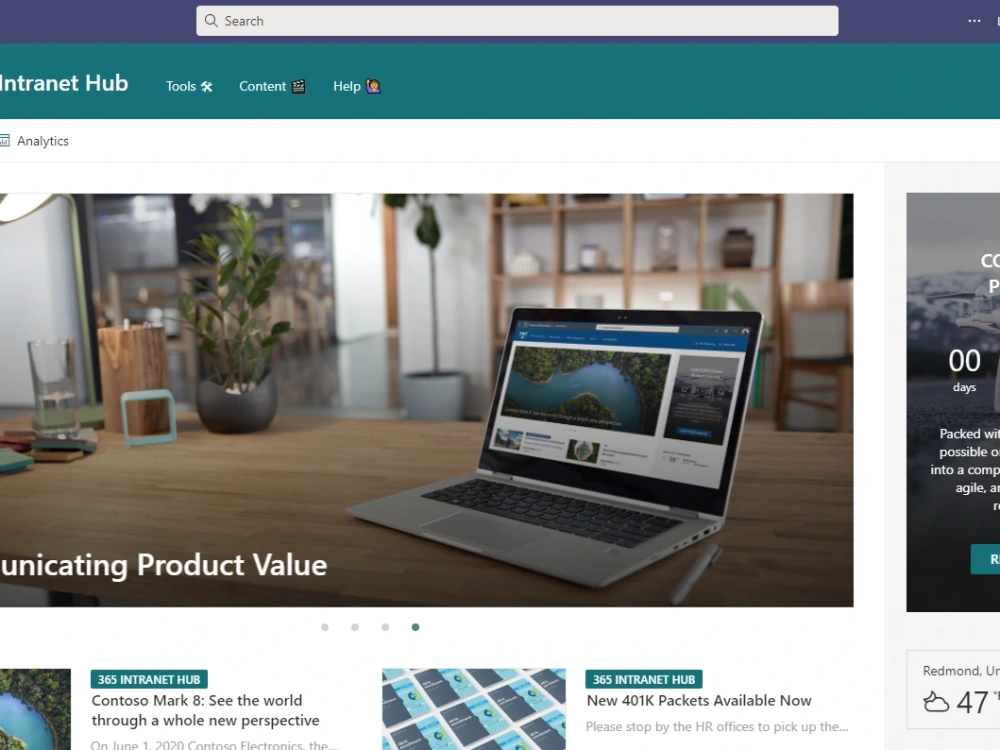
You will get a company-wide intranet communication tool.
Top Rated
Project details
flexible, easy to update company-wide intranet using modern SharePoint Online platform. I follow ux/ui best practices and the final step is to pin the intranet app in your employee's Teams app at the top. Top down communication and tools right at your employee's fingertips.
Coding Expertise
Performance Optimization, Security, DesignWhat's included
| Service Tiers |
Starter
$5,000
|
Standard
$10,000
|
Advanced
$15,000
|
|---|---|---|---|
| Delivery Time | 30 days | 50 days | 70 days |
Number of Revisions | 1 | 3 | 5 |
Number of Pages | 5 | 10 | 15 |
Design Customization | - | - | - |
Content Upload | - | - | - |
Responsive Design | - | - | |
Source Code | - | - |
24 reviews
(19)
(3)
(2)
(0)
(0)
This project doesn't have any reviews.
CC
Chris Hoffman C.
Mar 24, 2026
Microsoft 365 Setup
CS
Colton S.
Aug 25, 2025
Power Automate & Teams Automation
Kent is awesome at automating processes and also takes the time to explain what each step means, in detail. Which was very beneficial because my main concern was creating and automation, having it break, and not knowing where to even begin looking. Highly recommend.
ML
Marco L.
Apr 28, 2025
Document Management Expert Consulting SharePoint
AB
Andrew B.
Dec 18, 2024
HR SharePoint Intranet Page Development
DM
David M.
Jun 26, 2024
SharePoint Architect / Designer needed for nine-month project
Kent was not only an expert in solving our SharePoint challenges, he is also truly easy to work with and a consummate professional. Thank you Kent!
About Kent
Office 365, SharePoint, Migration and Teams Integration Specialist
100%
Job Success
Bellingham, United States - 1:18 pm local time
Expert level skills in: Microsoft 365 administration, Business Process Automation, Teams, Planner, Planner Task Rollup Across all Plans, Microsoft Flow, Power Automate, Power Apps, Project Online, SharePoint Online and On Premises, Search Configuration.
I've helped clients with requests such as:
Automatically create tasks in the Planner based on keywords in the subject line of the email
Migrate their content from On Premise SharePoint to SharePoint Online
Quality Management System ( QMS ) built on SharePoint platform with approval routing of documents
Rollup all Planner tasks into one view for management, department heads
Build Automation to check a facility list for upcoming inspections, certifications, audits, renewals
Automatically send a text message when the client's boss sends an email
Automate data entry from an email to SharePoint list, using power automate flow
Build a customer database in the cloud and track all interaction/marketing attempts
Purchase Order Requisition application with flow approval
Physician Network Adequacy app
Custom project site templates in teams
Document Center approach to SharePoint rather than individual, document libraries
Implement Microsoft Teams and provide best use scenarios
Steps for completing your project
After purchasing the project, send requirements so Kent can start the project.
Delivery time starts when Kent receives requirements from you.
Kent works on your project following the steps below.
Revisions may occur after the delivery date.
client's requirements are reviewed
and we meet to walk-thru specifics and answer questions