You will get AI-Powered Email Triage & Auto-Routing
Project details
Incoming emails get classified by AI, routed to the right team or folder, and logged. High-confidence classifications are handled automatically. Ambiguous emails get flagged for human review with the AI's recommendation attached. Nothing gets lost, nothing gets misrouted silently.
Database Type
PostgreSQLWhat's included
| Service Tiers |
Starter
$1,000
|
Standard
$2,000
|
Advanced
$3,500
|
|---|---|---|---|
| Delivery Time | 5 days | 5 days | 7 days |
Number of Revisions | 1 | 2 | 3 |
Schema Diagram | - | - | - |
Permissions Setup | - | - | - |
Import/Export Data | - | - | - |
Admin Panel Setup | - | - | - |
Optional add-ons
You can add these on the next page.
Fast Delivery
+$500 - $1,000About Elias
I Build AI-Powered Intake & Routing Systems That Replace Manual Triage
Columbia, United States - 1:05 am local time
I build systems that do it automatically.
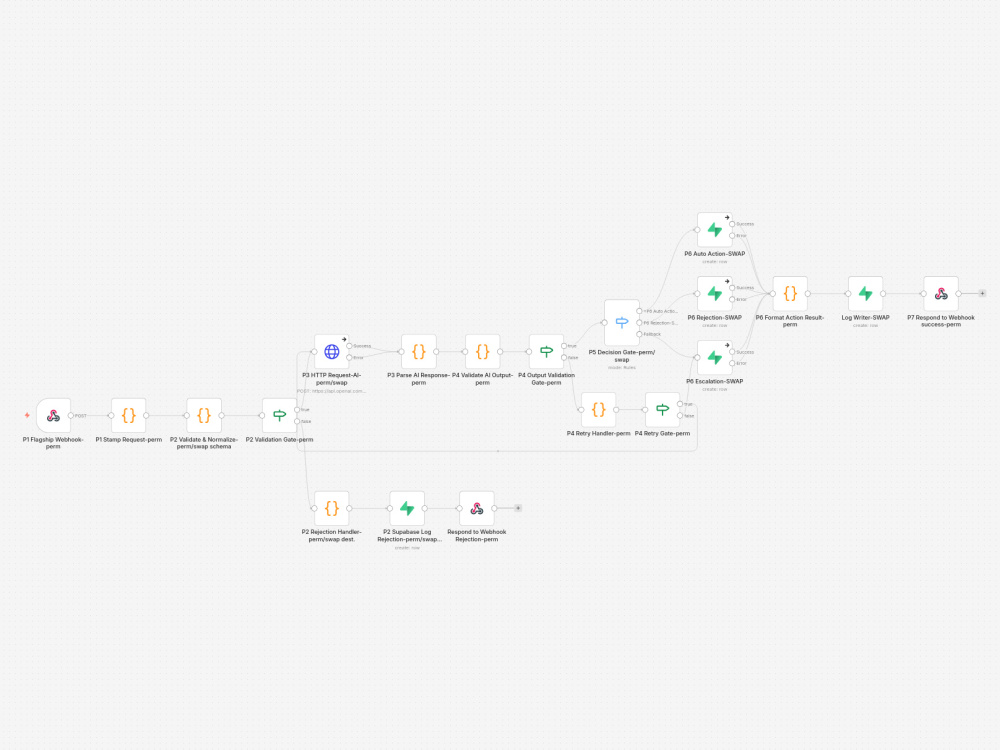
Here's how it works: your data comes in through a webhook or integration. AI classifies it into your categories with a confidence score. High-confidence items get actioned automatically — database update, Slack notification, CRM entry, email, whatever you need. Low-confidence items get escalated to your team with the AI's best guess attached. Everything is logged with a unique request ID so you can trace any item from intake to outcome.
What makes this different from a basic Zapier/Make setup:
- Confidence-based routing (the AI knows when it's unsure and asks a human)
- Retry logic (if the AI call fails, the system retries before escalating)
- Input validation (bad data gets rejected with clear error messages, not silently processed)
- Full audit logging (every request tracked, every decision recorded)
- Error handling (if anything breaks, the system fails safely and alerts you)
Tech stack: n8n (workflow automation), OpenAI (classification), Supabase/Postgres (logging and data). No vendor lock-in — you own everything.
Common use cases I've built:
- Support ticket classification and routing
- Lead qualification and scoring
- Email triage and auto-response
- Content moderation and flagging
- Document classification and routing
If you have a repetitive decision-making process that follows rules, I can automate it. Message me with what you're trying to solve and I'll tell you honestly if it's a fit.
Steps for completing your project
After purchasing the project, send requirements so Elias can start the project.
Delivery time starts when Elias receives requirements from you.
Elias works on your project following the steps below.
Revisions may occur after the delivery date.
Requirements Call
Confirm email categories, routing destinations per category, escalation contact, and confidence thresholds. I'll review example emails and map classification rules.
Core Build
Email intake, validation, AI classification with confidence scoring, auto-routing for clear cases, escalation for uncertain, rejection for junk. Error handling and logging on every path.