You will get Freelance project manager - Free tier
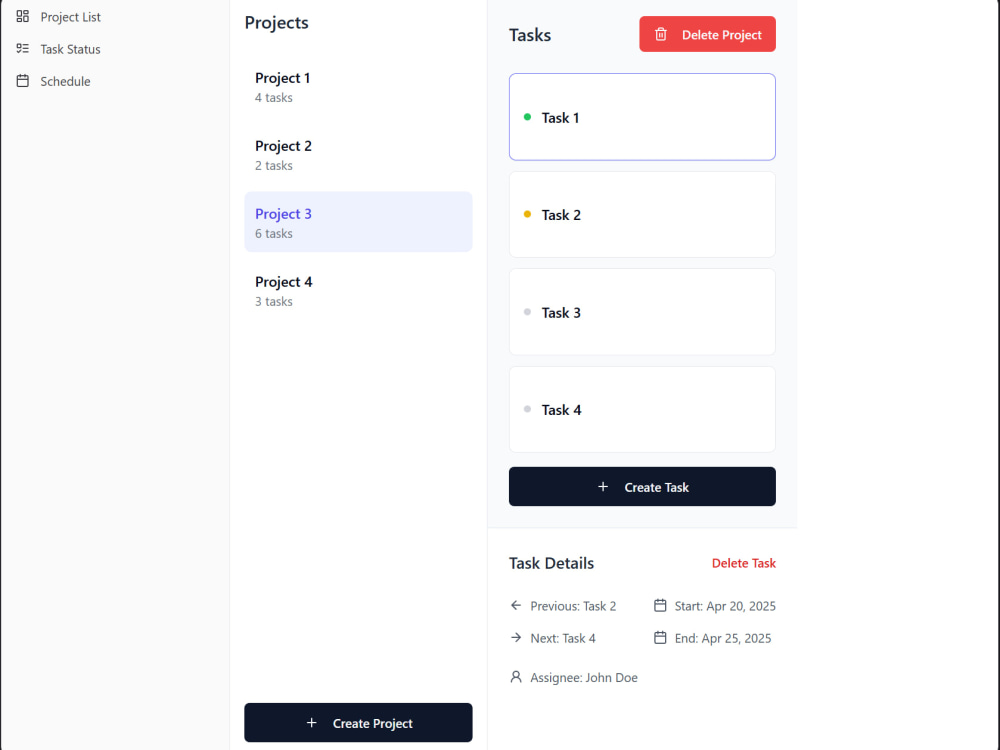
Project details
Depending on the license purchased, you have the following features:
1. Log in as a Manager/Client.
2. Access the Projects module, where you can:
2.1. Create Projects
2.2. Create Tasks within Projects
2.3. Create Subtasks within Parent Tasks. This section has a maximum depth of 5.
2.4. Enter Task Details such as: Parent Task, Next Task, Previous Task, Start Date, End Date, Assigned To, Description, Type, and Task Status.
2.5. Publish a Project and share it with your client.
3. Access the Tasks module, where you can:
3.1. Manage the status of Tasks using the Kanban Chart.
3.2. Improved management of the assignment, prioritization, classification, and detailing of tasks created in the Project module.
3.3. Filter Tasks by Project, multiple filters.
4. Access the Calendar Module, where you can:
4.1. Organize and schedule your tasks with the Gantt Chart.
4.2. Prioritize tasks.
4.3. Preview the view you will deliver to the Client.
1. Log in as a Manager/Client.
2. Access the Projects module, where you can:
2.1. Create Projects
2.2. Create Tasks within Projects
2.3. Create Subtasks within Parent Tasks. This section has a maximum depth of 5.
2.4. Enter Task Details such as: Parent Task, Next Task, Previous Task, Start Date, End Date, Assigned To, Description, Type, and Task Status.
2.5. Publish a Project and share it with your client.
3. Access the Tasks module, where you can:
3.1. Manage the status of Tasks using the Kanban Chart.
3.2. Improved management of the assignment, prioritization, classification, and detailing of tasks created in the Project module.
3.3. Filter Tasks by Project, multiple filters.
4. Access the Calendar Module, where you can:
4.1. Organize and schedule your tasks with the Gantt Chart.
4.2. Prioritize tasks.
4.3. Preview the view you will deliver to the Client.
Programming Languages
JavaScript, PythonWhat's included
| Service Tiers |
Starter
$5
|
Standard
$7
|
Advanced
$1,500
|
|---|---|---|---|
| Delivery Time | 1 day | 5 days | 10 days |
Number of Revisions | 1 | 1 | 1 |
Number of Pages | 2 | 3 | 3 |
Design Customization | - | ||
Content Upload | - | - | |
Responsive Design | |||
Source Code | - | - |
Optional add-ons
You can add these on the next page.
Additional Revision
+$20
Content Upload
+$5Frequently asked questions
About Daniel Nahun
Fullstack Web Developer, ETL Developer, RPA Developer, Data Analyst
Ilo, Peru - 7:26 pm local time
Steps for completing your project
After purchasing the project, send requirements so Daniel Nahun can start the project.
Delivery time starts when Daniel Nahun receives requirements from you.
Daniel Nahun works on your project following the steps below.
Revisions may occur after the delivery date.
Define product delivery times
I send the schedule of dates to the client with the tasks and deliverables to be completed.
Access information and completed work
If you have a free or monthly plan, you will be sent access to the platform by email. If you have a single-payment plan, you will be sent the minimum requirements to proceed with the deployment of the software in your local environment.