You will get Sheet to image generator to Image to Google Drive
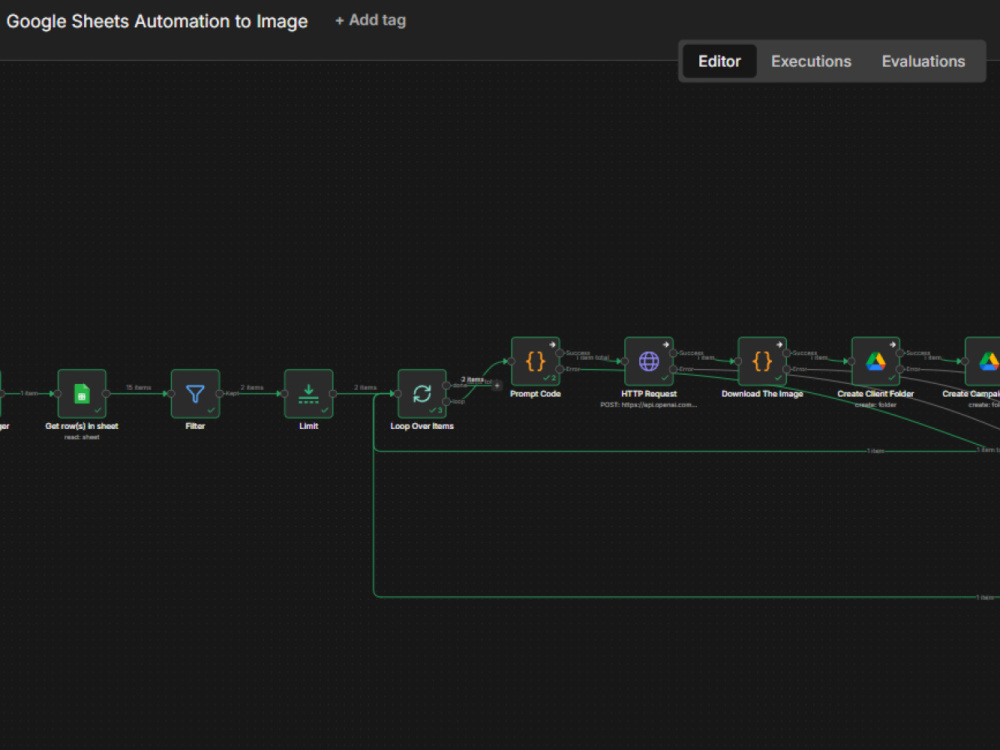
Project details
## 1. Working n8n Workflow
Monitors Google Sheet for rows with status = "queued"
Generates ad creative images using OpenAI DALL-E 3 API
Creates organized folder structure: /Client/Campaign/filename.png
Uploads images to Google Drive with proper naming
Updates sheet with status (ready/failed), Drive link, timestamp, and error log
Processes 20 rows per run, scheduled every 15 minutes
##2. Complete Integration Setup
Google Sheets OAuth2 (reads and updates your sheet)
Google Drive OAuth2 (creates folders and uploads files)
OpenAI API integration (uses your API key for DALL-E 3)
##3. Error Handling & Reliability
Continue-on-fail logic for graceful error handling
Detailed error logging in Google Sheet
Rate limit handling for DALL-E API (5-7 requests/min compliance)
Each failure logged without stopping other items
##4. Documentation & Training
Google Sheet template with correct column structure
Loom walkthrough showing:
How to add rows and trigger generation
How to modify prompts for different styles
How to troubleshoot common issues
Written setup guide for your n8n instance
Monitors Google Sheet for rows with status = "queued"
Generates ad creative images using OpenAI DALL-E 3 API
Creates organized folder structure: /Client/Campaign/filename.png
Uploads images to Google Drive with proper naming
Updates sheet with status (ready/failed), Drive link, timestamp, and error log
Processes 20 rows per run, scheduled every 15 minutes
##2. Complete Integration Setup
Google Sheets OAuth2 (reads and updates your sheet)
Google Drive OAuth2 (creates folders and uploads files)
OpenAI API integration (uses your API key for DALL-E 3)
##3. Error Handling & Reliability
Continue-on-fail logic for graceful error handling
Detailed error logging in Google Sheet
Rate limit handling for DALL-E API (5-7 requests/min compliance)
Each failure logged without stopping other items
##4. Documentation & Training
Google Sheet template with correct column structure
Loom walkthrough showing:
How to add rows and trigger generation
How to modify prompts for different styles
How to troubleshoot common issues
Written setup guide for your n8n instance
AI Algorithms
Large Language ModelAI Applications
AI Text-to-Image, Image Processing, Text RecognitionAI Development Language
JavaAI Models
DALL-EWhat's included $150
These options are included with the project scope.
$150
- Delivery Time 10 days
- Number of Revisions 2
- AI Model Integration
- Database Integration
- Model Documentation
- Prompt Engineering
- Setup File
About Efe
n8n Automation Specialist | AI Workflow Builder | Make & Zapier
Radzymin, Poland - 7:23 pm local time
What I deliver:
• WhatsApp AI chatbots (Twilio + Claude/OpenAI) for bookings and customer support
• CRM automation pipelines (Google Sheets, Calendar, lead scoring)
• Multi-platform content automation (AI-generated content, scheduled publishing)
• API integrations (REST, webhooks, JSON, Google APIs, Twilio)
• Data processing and transformation workflows
• Error handling, monitoring, and documentation
My most complex build is a fully autonomous restaurant reservation system: customer messages on WhatsApp → AI classification → calendar booking → CRM logging. Zero manual work.
I also build with Makecom and Zapier, but n8n is where I do my best work. Every workflow I deliver comes with documentation for maintainability.
Tech stack: n8n, Makecom, Zapier, Claude API, OpenAI API, Twilio, Google APIs, JavaScript, REST APIs, webhooks
Steps for completing your project
After purchasing the project, send requirements so Efe can start the project.
Delivery time starts when Efe receives requirements from you.
Efe works on your project following the steps below.
Revisions may occur after the delivery date.
Please contact me for the requests
After I recieve your request we can discuss on the deliverables and preferences